Streaming Channels
Streaming channels in Mezon enable real-time video broadcasting and interactive streaming experiences within clans. This feature allows users to broadcast live video content to channel members, creating engaging multimedia experiences for communities.
Overview
Streaming channels provide a platform for:
- Live video broadcasting within clan channels
- Real-time viewer interaction through chat and reactions
- WebRTC-based streaming for high-quality, low-latency transmission
- Bot integration for automated streaming management
- Cross-platform support for web, desktop, and mobile clients
Channel Types
Streaming Channel Type
ChannelType.CHANNEL_TYPE_STREAMING = 6;
Streaming channels are a specific channel type designed for video broadcasting functionality.
How to Stream in a Streaming Channel
Step 1: Create a Stream Channel
First, you need to create a new channel within a Clan.
Navigate to the channels section and choose a category to create a new channel. When prompted for the channel type, select Stream. Other available types are Text and Voice.
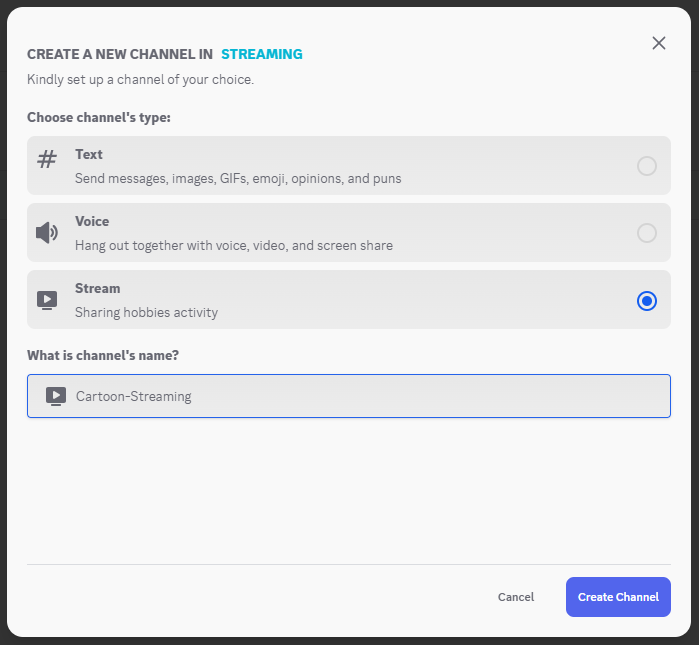
You have to provide a name for your stream channel. Finalize the creation process.

Step 2: Get Channel Information
After creating the channel, you must obtain its clan_id and channel_id. You can get this information from the browser URL or get it by listening to the channel creation event if you already have a Bot/App there.
//mezon.ai/chat/clans/1840666462012837888/channels/1977287012746530816

// or

https: this.client.onChannelCreated((channel) => {
  this.logger.info("New channel created:", channel.channel_id);
  this.logger.info("In clan:", channel.clan_id);
});
And these will be used in subsequent API calls.
Step 3: Bot Integration and Streaming
To broadcast the stream, you need to create a bot to handle the code integration and WebSocket communication.
Initialize the Bot
Initialize the Mezon client using your bot token and perform a login to retrieve an authentication token for the WebSocket connection[cite: 20].
const client = new MezonClient(BOT_TOKEN);
const dataLogin = await client.login();
const data = JSON.parse(dataLogin);
const token = data.token;
Initialize WebSocket Connection
Use the token obtained in the previous step to establish a WebSocket connection with the stn service.
const ws = new WebSocket(`wss://stn.mezon.ai/ws?token=${token}`);
Play Stream
To start the stream, you must send a specific message object through the WebSocket.
-
Define Parameters (
params): This object contains the details of the stream.{
"ChannelId": "channel_streaming_id",
"Password": "",
"FileUrl": ""
} -
Construct the Socket Message (
messageSocket): This message object tells the server to start a publisher (streamer).ClanId: The ID of the clan.ChannelId: The ID of the streaming channel.UserId: The Bot's user ID.Value: Theparamsobject defined above.Key: Must be set toconnect_publisherto initiate the stream.
const messageSocket = {
  ClanId: "clan_id",
  ChannelId: "channel_streaming_id",
  UserId: process.env.BOT_KOMU_ID,
  Value: params,
  Key: "connect_publisher",
}; -
Send the Message: Convert the
messageSocketobject to a JSON string and send it. Ensure the WebSocket connection is open before sending.const json = JSON.stringify(messageSocket);
if (this.ws.readyState === WebSocket.OPEN) {
this.ws.send(json);
} else {
console.debug("ws: send not ready, skipping...");
}
Stop Stream
To stop the stream, send another message object with a different key.
-
Define Parameters (
params): The structure is the same as for starting a stream.{
"ChannelId": "channel_streaming_id",
"Password": "",
"FileUrl": ""
} -
Construct the Socket Message (
messageSocket): The structure is similar to the start message, but with a differentKey.Key: Must be set to'stop_publisher'to terminate the stream.
const messageSocket = {
"ClanId": "clan_id",
"ChannelId": "channel_streaming_id",
"UserId": process.env.BOT_KOMU_ID,
"Value": params,
"Key": "stop_publisher"
}; -
Send the Message: Convert the object to a JSON string and send it via the open WebSocket connection.
const json = JSON.stringify(messageSocket);
if (this.ws.readyState === WebSocket.OPEN) {
  this.ws.send(json);
} else {
  console.debug("ws: send not ready, skipping...");
}
Streaming channels provide a powerful foundation for building engaging live video experiences within Mezon communities. Whether you're creating entertainment bots, educational content, or community events, the streaming infrastructure supports rich multimedia interactions.