Luồng xác thực Channel App
Nếu ứng dụng của bạn yêu cầu xác thực để truy cập tài nguyên và bạn muốn tận dụng hệ sinh thái người dùng hiện có trong các cộng đồng Mezon, Channel App cung cấp tính năng nâng cao giúp nhà phát triển tích hợp xác thực và phân quyền người dùng kênh thông qua hệ thống người dùng của Mezon.
Channel App cung cấp cơ chế xác thực mạnh mẽ cho phép tích hợp liền mạch giữa ứng dụng web của bạn và cơ sở người dùng Mezon, loại bỏ nhu cầu hệ thống quản lý người dùng riêng biệt.
Xác thực dựa trên Hash là gì?
Xác thực dựa trên hash là phương pháp bảo mật trong đó:
- Dữ liệu xác thực người dùng được nhúng trong chuỗi hash đã ký mật mã bởi nền tảng Mezon
- Hash chứa thông tin người dùng và được kiểm tra bằng chữ ký HMAC-SHA256
- Ứng dụng web của bạn kiểm tra chữ ký hash để xác thực người dùng
- Không cần chuyển hướng OAuth2 bên ngoài
Tổng quan kiến trúc
Bằng cách làm theo Hướng dẫn Bắt đầu, bạn đã có channel app trên nền tảng Mezon với ứng dụng web được tích hợp. Hãy khám phá mối quan hệ giữa các thành phần khác nhau trong luồng xác thực.
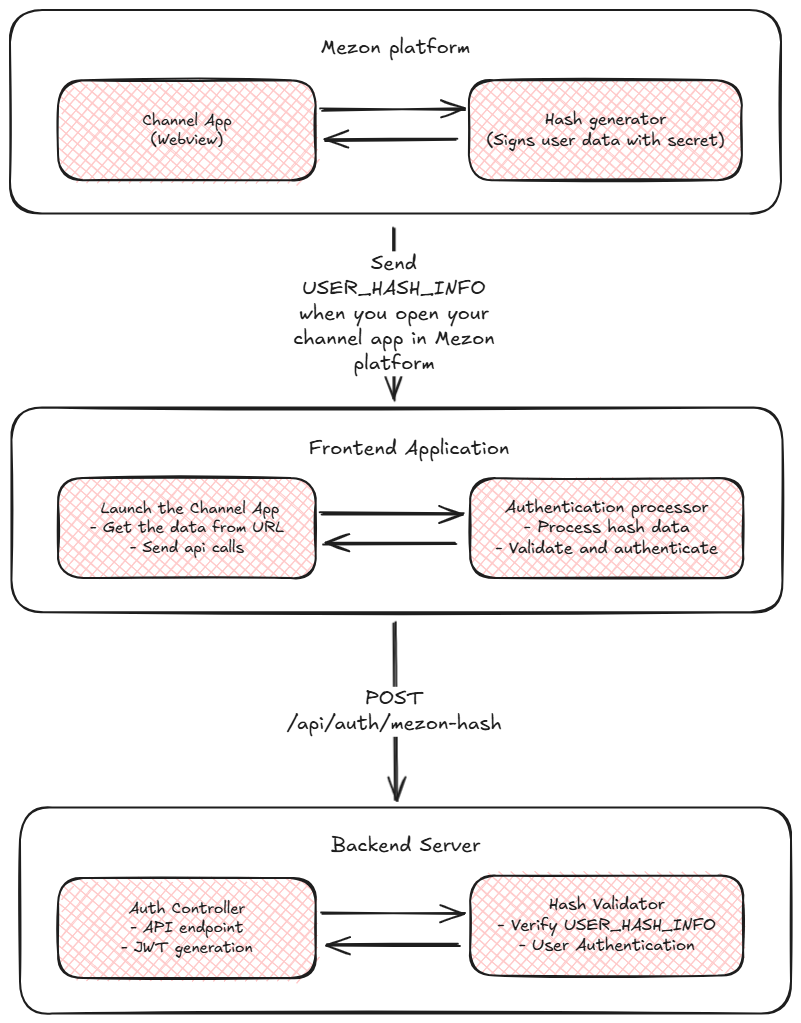
Cấu trúc dữ liệu Hash
Dữ liệu hash nhận từ Mezon chứa các thành phần sau:
Định dạng Hash thô
query_id=AAHdF6UqAAAAAB0XpSoKhRAd&user=%7B%22id%22%3A123456789%2C%22username%22%3A%22mezon_dev%22%2C%22mezon_id%22%3A%22mezon.dev%40ncc.asia%22%7D&auth_date=1640995200&signature=abc123def456&hash=7f3c4e8a9b2d1f6e5c8a7b4e9d2f8c1e6a9b3c7d
Các tham số đã giải mã
query_id: Mã định danh truy vấn duy nhất từ Mezonuser: Chuỗi JSON được mã hóa URL chứa thông tin người dùngauth_date: Unix timestamp thời điểm tạo xác thựcsignature: Dữ liệu chữ ký bổ sung để kiểm trahash: Chữ ký HMAC-SHA256 của toàn bộ dữ liệu (dùng để kiểm tra)
Cấu trúc đối tượng User
{
  "id": 123456789,
  "username": "mezon_dev",
  "display_name": "Mezon Dev",
  "avatar_url": "https://cdn.mezon.ai/avatar.jpg",
  "mezon_id": "mezon.dev@ncc.asia"
}
Triển khai luồng xác thực Hash như thế nào?
Bước 1: Triển khai Frontend
Khi Mezon mở channel app của bạn, nó truyền dữ liệu xác thực người dùng qua tham số truy vấn URL. Trích xuất dữ liệu này và gửi tới backend để kiểm tra.
Trích xuất dữ liệu xác thực từ URL
// Extract authentication data from URL query parameters
function getAuthDataFromURL() {
  const urlParams = new URLSearchParams(window.location.search);
  const authData = urlParams.get('data');

  if (!authData) {
    console.warn('No authentication data found in URL');
    return null;
  }

  // Decode the URL-encoded data
  return decodeURIComponent(authData);
}

// Get the authentication data
const rawHashData = getAuthDataFromURL();

if (rawHashData) {
  console.log('Authentication data received:', rawHashData);
  // Process the hash data for authentication
  authenticateWithHash(rawHashData);
} else {
  console.error('No authentication data available');
  // Handle the case where no auth data is present
}
Triển khai Frontend đầy đủ
Dưới đây là triển khai HTML và JavaScript toàn diện để xử lý xác thực Mezon qua tham số URL:
<!DOCTYPE html>
<html lang="en">
  <head>
    <meta charset="UTF-8" />
    <meta name="viewport" content="width=device-width, initial-scale=1.0" />
    <title>Mezon Channel App Authentication</title>
    <style>
      body {
        font-family: Arial, sans-serif;
        margin: 0;
        padding: 20px;
        background: var(--mezon-bg-color, #f5f5f5);
        color: var(--mezon-text-color, #333);
      }

      .auth-container {
        max-width: 600px;
        margin: 0 auto;
        padding: 20px;
        background: var(--mezon-card-bg, #ffffff);
        border-radius: 8px;
        box-shadow: 0 2px 4px rgba(0, 0, 0, 0.1);
      }

      .status {
        padding: 10px;
        border-radius: 5px;
        margin: 10px 0;
      }

      .status.loading {
        background-color: #fff3cd;
        color: #856404;
      }
      .status.success {
        background-color: #d4edda;
        color: #155724;
      }
      .status.error {
        background-color: #f8d7da;
        color: #721c24;
      }
      .status.info {
        background-color: #d1ecf1;
        color: #0c5460;
      }

      .auth-details {
        background: #f8f9fa;
        padding: 15px;
        border-radius: 5px;
        margin: 15px 0;
        font-family: monospace;
        font-size: 12px;
        white-space: pre-wrap;
      }

      button {
        background: var(--mezon-button-bg, #007bff);
        color: var(--mezon-button-text, white);
        border: none;
        padding: 10px 20px;
        border-radius: 5px;
        cursor: pointer;
        margin: 5px;
      }

      button:hover {
        background: var(--mezon-button-hover, #0056b3);
      }
    </style>
  </head>
  <body>
    <div class="auth-container">
      <h1>Mezon Channel App Authentication</h1>

      <div id="connectionStatus" class="status info">Initializing...</div>

      <div id="authSection">
        <h3>Authentication Status</h3>
        <div id="authStatus" class="status info">Ready to authenticate</div>
      </div>

      <div id="userInfo" style="display: none;">
        <h3>Authenticated User</h3>
        <div id="userDetails" class="auth-details"></div>
      </div>
    </div>

    <script>
      class MezonAuthApp {
        constructor() {
          this.authEndpoint = "/api/auth/mezon-hash"; // Your backend auth endpoint
          this.init();
        }

        init() {
          this.updateConnectionStatus();
          this.checkForAuthData();
        }

        updateConnectionStatus() {
          const statusEl = document.getElementById("connectionStatus");
          statusEl.className = "status success";
          statusEl.innerHTML = "✅ Channel App Loaded";
        }

        checkForAuthData() {
          // Extract authentication data from URL
          const authData = this.getAuthDataFromURL();

          if (authData) {
            this.updateAuthStatus("Authentication data found", "info");
            this.authenticateWithHash(authData);
          } else {
            this.updateAuthStatus("No authentication data found in URL", "info");
          }
        }

        getAuthDataFromURL() {
          const urlParams = new URLSearchParams(window.location.search);
          const authData = urlParams.get('data');

          if (!authData) {
            console.warn('No authentication data found in URL');
            return null;
          }

          try {
            // Decode the URL-encoded data
            const decodedData = decodeURIComponent(authData);
            console.log('Authentication data received');
            return decodedData;
          } catch (error) {
            console.error('Error decoding authentication data:', error);
            return null;
          }
        }

        authenticateWithHash(rawHashData) {
          console.log("Processing hash data for authentication");
          this.updateAuthStatus("Processing authentication...", "loading");

          try {
            // Process hash data
            const authModel = this.processHashData(rawHashData);

            // Send to backend for validation
            this.sendAuthRequest(authModel);
          } catch (error) {
            console.error("Error processing hash data:", error);
            this.updateAuthStatus(
              "Error processing authentication data",
              "error"
            );
          }
        }

        processHashData(rawHashData) {
          // Base64 encode the hash data for secure transmission
          const encodedHashData = btoa(rawHashData);

          return {
            hashData: encodedHashData,
          };
        }

        async sendAuthRequest(authModel) {
          try {
            const response = await fetch(this.authEndpoint, {
              method: "POST",
              headers: {
                "Content-Type": "application/json",
              },
              body: JSON.stringify(authModel),
            });

            if (!response.ok) {
              throw new Error(`Authentication failed: ${response.statusText}`);
            }

            const result = await response.json();
            this.handleAuthSuccess(result);
          } catch (error) {
            console.error("Authentication request failed:", error);
            this.updateAuthStatus(
              `Authentication failed: ${error.message}`,
              "error"
            );
          }
        }

        handleAuthSuccess(result) {
          console.log("Authentication successful:", result);
          this.updateAuthStatus("Authentication successful!", "success");

          // Store the authentication token
          if (result.token) {
            localStorage.setItem("auth_token", result.token);
          }

          // Display user information
          if (result.user) {
            this.displayUserInfo(result.user);
          }

          // Redirect or continue with app initialization
          // window.location.href = '/dashboard';
        }

        displayUserInfo(user) {
          const userInfoDiv = document.getElementById("userInfo");
          const userDetailsDiv = document.getElementById("userDetails");

          userDetailsDiv.textContent = JSON.stringify(user, null, 2);
          userInfoDiv.style.display = "block";
        }

        updateAuthStatus(message, type) {
          const authStatusEl = document.getElementById("authStatus");
          authStatusEl.className = `status ${type}`;
          authStatusEl.textContent = message;
        }
      }

      // Initialize the app when DOM is ready
      const mezonAuthApp = new MezonAuthApp();
    </script>
  </body>
</html>
Trình xử lý xác thực đơn giản
Để tích hợp vào ứng dụng hiện có, đây là lớp JavaScript đơn giản:
class SimpleMezonAuth {
  constructor(options = {}) {
    this.authEndpoint = options.authEndpoint || "/api/auth/mezon-hash";
    this.onSuccess = options.onSuccess || this.defaultSuccessHandler;
    this.onError = options.onError || this.defaultErrorHandler;

    this.init();
  }

  init() {
    this.startAuthFlow();
  }

  startAuthFlow() {
    // Extract auth data from URL
    const authData = this.getAuthDataFromURL();

    if (authData) {
      this.processAuthentication(authData);
    } else {
      this.onError('No authentication data found in URL');
    }
  }

  getAuthDataFromURL() {
    const urlParams = new URLSearchParams(window.location.search);
    const authData = urlParams.get('data');

    if (!authData) {
      return null;
    }

    try {
      return decodeURIComponent(authData);
    } catch (error) {
      console.error('Error decoding auth data:', error);
      return null;
    }
  }

  async processAuthentication(rawHashData) {
    try {
      const authData = {
        hashData: btoa(rawHashData),
      };

      const response = await fetch(this.authEndpoint, {
        method: "POST",
        headers: { "Content-Type": "application/json" },
        body: JSON.stringify(authData),
      });

      const result = await response.json();

      if (result.success) {
        this.onSuccess(result);
      } else {
        this.onError(result.error);
      }
    } catch (error) {
      this.onError(error.message);
    }
  }

  defaultSuccessHandler(result) {
    console.log("Authentication successful:", result);
    if (result.token) {
      localStorage.setItem("auth_token", result.token);
    }
  }

  defaultErrorHandler(error) {
    console.error("Authentication failed:", error);
  }
}

// Usage example:
// const auth = new SimpleMezonAuth({
//     authEndpoint: '/api/auth/mezon-hash',
//     onSuccess: (result) => {
//         console.log('User authenticated:', result.user);
//         window.location.href = '/dashboard';
//     },
//     onError: (error) => {
//         alert('Authentication failed: ' + error);
//     }
// });
Bước 2: Triển khai Backend
Ở phía máy chủ, bạn cần định nghĩa endpoint nhận thông tin hash người dùng và kiểm tra nó.
Quy trình kiểm tra Hash
Quy trình kiểm tra hash liên quan đến việc hiểu cơ chế và dữ liệu mà Mezon sử dụng. Quy trình tạo token hash gồm 3 bước:
- MD5 Hash: App Secret của bạn được hash bằng MD5, kết quả dùng làm khóa cho bước 2
- HMAC-SHA256: Dùng HMAC-SHA256 với khóa từ bước 1 để hash chuỗi "WebAppData", kết quả dùng ở bước 3
- Final Hash: Dùng toàn bộ dữ liệu gửi từ frontend (trừ phần hash) làm đầu vào cho bước 3, kết hợp với kết quả từ bước 2 làm khóa. Hash toàn bộ dữ liệu bằng HMAC-SHA256 để có chuỗi hash cuối cùng
- Node.js
- Python
- Go
- Java
- C#
const crypto = require('crypto');

function validateMezonHash(appSecret, hashData) {
  try {
    // Parse hash data
    const delimiter = '&hash=';
    const index = hashData.indexOf(delimiter);
    const queryData = hashData.substring(0, index);
    const receivedHash = hashData.substring(index + delimiter.length);

    // Step 1: MD5 hash of app secret
    const hashedSecret = crypto.createHash('md5').update(appSecret).digest('hex');

    // Step 2: HMAC-SHA256 of "WebAppData" with hashed secret
    const secretKey = crypto.createHmac('sha256', hashedSecret).update('WebAppData').digest();

    // Step 3: HMAC-SHA256 of query data with secret key
    const computedHash = crypto.createHmac('sha256', secretKey).update(queryData).digest('hex');

    // Compare hashes
    return computedHash === receivedHash;
  } catch (error) {
    console.error('Hash validation error:', error);
    return false;
  }
}

// Usage example
app.post('/api/auth/mezon-hash', (req, res) => {
  const { hashData } = req.body;
  const rawHashData = Buffer.from(hashData, 'base64').toString('utf-8');

  const isValid = validateMezonHash(process.env.MEZON_APP_SECRET, rawHashData);

  if (isValid) {
    // Extract user data and create session
    const userData = parseUserData(rawHashData);
    const token = generateJWTToken(userData);

    res.json({
      success: true,
      accessToken: token,
      user: userData
    });
  } else {
    res.status(401).json({
      success: false,
      error: 'Invalid hash signature'
    });
  }
});
import hmac
import hashlib
import base64
import urllib.parse
import json

def validate_mezon_hash(app_secret, hash_data):
    try:
        # Parse hash data
        delimiter = '&hash='
        index = hash_data.find(delimiter)
        query_data = hash_data[:index]
        received_hash = hash_data[index + len(delimiter):]

        # Step 1: MD5 hash of app secret
        hashed_secret = hashlib.md5(app_secret.encode()).hexdigest()

        # Step 2: HMAC-SHA256 of "WebAppData" with hashed secret
        secret_key = hmac.new(
            hashed_secret.encode(),
            b'WebAppData',
            hashlib.sha256
        ).digest()

        # Step 3: HMAC-SHA256 of query data with secret key
        computed_hash = hmac.new(
            secret_key,
            query_data.encode(),
            hashlib.sha256
        ).hexdigest()

        # Compare hashes
        return computed_hash == received_hash
    except Exception as e:
        print(f"Hash validation error: {e}")
        return False

def parse_user_data(hash_data):
    # Extract query parameters
    delimiter = '&hash='
    query_data = hash_data[:hash_data.find(delimiter)]
    params = urllib.parse.parse_qs(query_data)

    # Parse user JSON
    user_json = urllib.parse.unquote(params['user'][0])
    user_data = json.loads(user_json)

    return {
        'query_id': params['query_id'][0],
        'user': user_data,
        'auth_date': int(params['auth_date'][0]),
        'signature': params['signature'][0] if 'signature' in params else None
    }

# Flask example
from flask import Flask, request, jsonify
import jwt
import os

app = Flask(__name__)

@app.route('/api/auth/mezon-hash', methods=['POST'])
def mezon_hash_auth():
    data = request.get_json()
    hash_data = data.get('hashData')

    # Decode base64 hash data
    raw_hash_data = base64.b64decode(hash_data).decode('utf-8')

    # Validate hash
    app_secret = os.getenv('MEZON_APP_SECRET')
    is_valid = validate_mezon_hash(app_secret, raw_hash_data)

    if is_valid:
        # Parse user data
        user_data = parse_user_data(raw_hash_data)

        # Generate JWT token
        token = jwt.encode({
            'user_id': user_data['user']['id'],
            'username': user_data['user']['username'],
            'mezon_id': user_data['user']['mezon_id']
        }, os.getenv('JWT_SECRET'), algorithm='HS256')

        return jsonify({
            'success': True,
            'accessToken': token,
            'user': user_data['user']
        })
    else:
        return jsonify({
            'success': False,
            'error': 'Invalid hash signature'
        }), 401
package main

import (
    "crypto/hmac"
    "crypto/md5"
    "crypto/sha256"
    "encoding/base64"
    "encoding/hex"
    "encoding/json"
    "fmt"
    "net/http"
    "net/url"
    "strconv"
    "strings"
)

type MezonUser struct {
    ID       int64  `json:"id"`
    Username string `json:"username"`
    MezonID  string `json:"mezon_id"`
}

type HashData struct {
    QueryID   string    `json:"query_id"`
    User      MezonUser `json:"user"`
    AuthDate  int64     `json:"auth_date"`
    Signature string    `json:"signature"`
}

func validateMezonHash(appSecret, hashData string) bool {
    // Parse hash data
    delimiter := "&hash="
    index := strings.Index(hashData, delimiter)
    if index == -1 {
        return false
    }

    queryData := hashData[:index]
    receivedHash := hashData[index+len(delimiter):]

    // Step 1: MD5 hash of app secret
    hasher := md5.New()
    hasher.Write([]byte(appSecret))
    hashedSecret := hex.EncodeToString(hasher.Sum(nil))

    // Step 2: HMAC-SHA256 of "WebAppData" with hashed secret
    mac := hmac.New(sha256.New, []byte(hashedSecret))
    mac.Write([]byte("WebAppData"))
    secretKey := mac.Sum(nil)

    // Step 3: HMAC-SHA256 of query data with secret key
    mac2 := hmac.New(sha256.New, secretKey)
    mac2.Write([]byte(queryData))
    computedHash := hex.EncodeToString(mac2.Sum(nil))

    // Compare hashes
    return computedHash == receivedHash
}

func parseUserData(hashData string) (*HashData, error) {
    delimiter := "&hash="
    index := strings.Index(hashData, delimiter)
    queryData := hashData[:index]

    // Parse query parameters
    values, err := url.ParseQuery(queryData)
    if err != nil {
        return nil, err
    }

    // Parse user JSON
    userJSON, err := url.QueryUnescape(values.Get("user"))
    if err != nil {
        return nil, err
    }

    var user MezonUser
    if err := json.Unmarshal([]byte(userJSON), &user); err != nil {
        return nil, err
    }

    authDate, err := strconv.ParseInt(values.Get("auth_date"), 10, 64)
    if err != nil {
        return nil, err
    }

    return &HashData{
        QueryID:   values.Get("query_id"),
        User:      user,
        AuthDate:  authDate,
        Signature: values.Get("signature"),
    }, nil
}

func mezonHashAuthHandler(w http.ResponseWriter, r *http.Request) {
    var reqData struct {
        HashData string `json:"hashData"`
    }

    if err := json.NewDecoder(r.Body).Decode(&reqData); err != nil {
        http.Error(w, "Invalid request", http.StatusBadRequest)
        return
    }

    // Decode base64 hash data
    rawHashData, err := base64.StdEncoding.DecodeString(reqData.HashData)
    if err != nil {
        http.Error(w, "Invalid hash data", http.StatusBadRequest)
        return
    }

    // Validate hash
    appSecret := os.Getenv("MEZON_APP_SECRET")
    if !validateMezonHash(appSecret, string(rawHashData)) {
        http.Error(w, "Invalid hash signature", http.StatusUnauthorized)
        return
    }

    // Parse user data
    userData, err := parseUserData(string(rawHashData))
    if err != nil {
        http.Error(w, "Failed to parse user data", http.StatusBadRequest)
        return
    }

    // Generate JWT token (implement your JWT logic here)
    token := generateJWTToken(userData.User)

    response := map[string]interface{}{
        "success":     true,
        "accessToken": token,
        "user":        userData.User,
    }

    w.Header().Set("Content-Type", "application/json")
    json.NewEncoder(w).Encode(response)
}
import javax.crypto.Mac;
import javax.crypto.spec.SecretKeySpec;
import java.security.MessageDigest;
import java.util.Base64;
import java.net.URLDecoder;
import java.util.HashMap;
import java.util.Map;
import com.fasterxml.jackson.databind.ObjectMapper;

public class MezonHashValidator {

    public static boolean validateMezonHash(String appSecret, String hashData) {
        try {
            // Parse hash data
            String delimiter = "&hash=";
            int index = hashData.indexOf(delimiter);
            if (index == -1) return false;

            String queryData = hashData.substring(0, index);
            String receivedHash = hashData.substring(index + delimiter.length());

            // Step 1: MD5 hash of app secret
            MessageDigest md5 = MessageDigest.getInstance("MD5");
            byte[] hashedSecretBytes = md5.digest(appSecret.getBytes());
            String hashedSecret = bytesToHex(hashedSecretBytes);

            // Step 2: HMAC-SHA256 of "WebAppData" with hashed secret
            Mac mac1 = Mac.getInstance("HmacSHA256");
            SecretKeySpec secretKeySpec1 = new SecretKeySpec(hashedSecret.getBytes(), "HmacSHA256");
            mac1.init(secretKeySpec1);
            byte[] secretKey = mac1.doFinal("WebAppData".getBytes());

            // Step 3: HMAC-SHA256 of query data with secret key
            Mac mac2 = Mac.getInstance("HmacSHA256");
            SecretKeySpec secretKeySpec2 = new SecretKeySpec(secretKey, "HmacSHA256");
            mac2.init(secretKeySpec2);
            byte[] computedHashBytes = mac2.doFinal(queryData.getBytes());
            String computedHash = bytesToHex(computedHashBytes);

            // Compare hashes
            return computedHash.equals(receivedHash);
        } catch (Exception e) {
            e.printStackTrace();
            return false;
        }
    }

    private static String bytesToHex(byte[] bytes) {
        StringBuilder result = new StringBuilder();
        for (byte b : bytes) {
            result.append(String.format("%02x", b));
        }
        return result.toString();
    }

    public static Map<String, Object> parseUserData(String hashData) throws Exception {
        String delimiter = "&hash=";
        int index = hashData.indexOf(delimiter);
        String queryData = hashData.substring(0, index);

        // Parse query parameters
        Map<String, String> params = new HashMap<>();
        String[] pairs = queryData.split("&");
        for (String pair : pairs) {
            String[] keyValue = pair.split("=", 2);
            if (keyValue.length == 2) {
                params.put(keyValue[0], URLDecoder.decode(keyValue[1], "UTF-8"));
            }
        }

        // Parse user JSON
        ObjectMapper mapper = new ObjectMapper();
        Map<String, Object> user = mapper.readValue(params.get("user"), Map.class);

        Map<String, Object> result = new HashMap<>();
        result.put("query_id", params.get("query_id"));
        result.put("user", user);
        result.put("auth_date", Long.parseLong(params.get("auth_date")));
        result.put("signature", params.get("signature"));

        return result;
    }

    // Spring Boot Controller example
    @RestController
    public class AuthController {

        @Value("${mezon.app.secret}")
        private String appSecret;

        @PostMapping("/api/auth/mezon-hash")
        public ResponseEntity<?> mezonHashAuth(@RequestBody Map<String, String> request) {
            try {
                String hashData = request.get("hashData");

                // Decode base64 hash data
                byte[] decodedBytes = Base64.getDecoder().decode(hashData);
                String rawHashData = new String(decodedBytes);

                // Validate hash
                if (!validateMezonHash(appSecret, rawHashData)) {
                    return ResponseEntity.status(401).body(
                        Map.of("success", false, "error", "Invalid hash signature")
                    );
                }

                // Parse user data
                Map<String, Object> userData = parseUserData(rawHashData);

                // Generate JWT token
                String token = generateJWTToken(userData);

                return ResponseEntity.ok(Map.of(
                    "success", true,
                    "accessToken", token,
                    "user", userData.get("user")
                ));
            } catch (Exception e) {
                return ResponseEntity.status(500).body(
                    Map.of("success", false, "error", "Authentication failed")
                );
            }
        }
    }
}
using System;
using System.Security.Cryptography;
using System.Text;
using System.Web;
using System.Collections.Generic;
using Newtonsoft.Json;

public class MezonHashValidator
{
    public static bool ValidateMezonHash(string appSecret, string hashData)
    {
        try
        {
            // Parse hash data
            string delimiter = "&hash=";
            int index = hashData.IndexOf(delimiter);
            if (index == -1) return false;

            string queryData = hashData.Substring(0, index);
            string receivedHash = hashData.Substring(index + delimiter.Length);

            // Step 1: MD5 hash of app secret
            using (var md5 = MD5.Create())
            {
                byte[] hashedSecretBytes = md5.ComputeHash(Encoding.UTF8.GetBytes(appSecret));
                string hashedSecret = BitConverter.ToString(hashedSecretBytes)
                    .Replace("-", "").ToLowerInvariant();

                // Step 2: HMAC-SHA256 of "WebAppData" with hashed secret
                using (var hmac1 = new HMACSHA256(Encoding.UTF8.GetBytes(hashedSecret)))
                {
                    byte[] secretKey = hmac1.ComputeHash(Encoding.UTF8.GetBytes("WebAppData"));

                    // Step 3: HMAC-SHA256 of query data with secret key
                    using (var hmac2 = new HMACSHA256(secretKey))
                    {
                        byte[] computedHashBytes = hmac2.ComputeHash(Encoding.UTF8.GetBytes(queryData));
                        string computedHash = BitConverter.ToString(computedHashBytes)
                            .Replace("-", "").ToLowerInvariant();

                        // Compare hashes
                        return computedHash.Equals(receivedHash, StringComparison.OrdinalIgnoreCase);
                    }
                }
            }
        }
        catch (Exception ex)
        {
            Console.WriteLine($"Hash validation error: {ex.Message}");
            return false;
        }
    }

    public static Dictionary<string, object> ParseUserData(string hashData)
    {
        string delimiter = "&hash=";
        int index = hashData.IndexOf(delimiter);
        string queryData = hashData.Substring(0, index);

        // Parse query parameters
        var queryParams = HttpUtility.ParseQueryString(queryData);

        // Parse user JSON
        string userJson = HttpUtility.UrlDecode(queryParams["user"]);
        var user = JsonConvert.DeserializeObject<Dictionary<string, object>>(userJson);

        return new Dictionary<string, object>
        {
            ["query_id"] = queryParams["query_id"],
            ["user"] = user,
            ["auth_date"] = long.Parse(queryParams["auth_date"]),
            ["signature"] = queryParams["signature"]
        };
    }
}

// ASP.NET Core Controller example
[ApiController]
[Route("api/[controller]")]
public class AuthController : ControllerBase
{
    private readonly IConfiguration _configuration;

    public AuthController(IConfiguration configuration)
    {
        _configuration = configuration;
    }

    [HttpPost("mezon-hash")]
    public IActionResult MezonHashAuth([FromBody] MezonHashAuthRequest request)
    {
        try
        {
            // Decode base64 hash data
            string rawHashData = Encoding.UTF8.GetString(Convert.FromBase64String(request.HashData));

            // Validate hash
            string appSecret = _configuration["Mezon:AppSecret"];
            if (!MezonHashValidator.ValidateMezonHash(appSecret, rawHashData))
            {
                return Unauthorized(new { success = false, error = "Invalid hash signature" });
            }

            // Parse user data
            var userData = MezonHashValidator.ParseUserData(rawHashData);

            // Generate JWT token
            string token = GenerateJWTToken(userData);

            return Ok(new
            {
                success = true,
                accessToken = token,
                user = userData["user"]
            });
        }
        catch (Exception ex)
        {
            return StatusCode(500, new { success = false, error = "Authentication failed" });
        }
    }
}

public class MezonHashAuthRequest
{
    public string HashData { get; set; }
}
Ví dụ triển khai Backend đầy đủ (Node.js/Express)
const express = require("express");
const crypto = require("crypto");
const jwt = require("jsonwebtoken");
const app = express();

app.use(express.json());

// Utility functions
function validateMezonHash(appSecret, hashData) {
  try {
    const delimiter = "&hash=";
    const index = hashData.indexOf(delimiter);
    const queryData = hashData.substring(0, index);
    const receivedHash = hashData.substring(index + delimiter.length);

    // Hash validation process
    const hashedSecret = crypto
      .createHash("md5")
      .update(appSecret)
      .digest("hex");
    const secretKey = crypto
      .createHmac("sha256", hashedSecret)
      .update("WebAppData")
      .digest();
    const computedHash = crypto
      .createHmac("sha256", secretKey)
      .update(queryData)
      .digest("hex");

    return computedHash === receivedHash;
  } catch (error) {
    console.error("Hash validation error:", error);
    return false;
  }
}

function parseUserData(hashData) {
  const delimiter = "&hash=";
  const queryData = hashData.substring(0, hashData.indexOf(delimiter));

  const params = new URLSearchParams(queryData);
  const userJSON = decodeURIComponent(params.get("user"));
  const user = JSON.parse(userJSON);

  return {
    query_id: params.get("query_id"),
    user: user,
    auth_date: parseInt(params.get("auth_date")),
    signature: params.get("signature"),
  };
}

function generateJWTToken(userData) {
  const payload = {
    user_id: userData.user.id,
    username: userData.user.username,
    mezon_id: userData.user.mezon_id,
    exp: Math.floor(Date.now() / 1000) + 60 * 60 * 24, // 24 hours
  };

  return jwt.sign(payload, process.env.JWT_SECRET);
}

// Authentication endpoint
app.post("/api/auth/mezon-hash", async (req, res) => {
  try {
    const { hashData } = req.body;

    if (!hashData) {
      return res.status(400).json({
        success: false,
        error: "Hash data is required",
      });
    }

    // Decode base64 hash data
    const rawHashData = Buffer.from(hashData, "base64").toString("utf-8");
    console.log("Received hash data:", rawHashData);

    // Validate hash signature
    const isValid = validateMezonHash(
      process.env.MEZON_APP_SECRET,
      rawHashData
    );
    if (!isValid) {
      return res.status(401).json({
        success: false,
        error: "Invalid hash signature",
      });
    }

    // Parse user data
    const userData = parseUserData(rawHashData);
    console.log("Parsed user data:", userData);

    // Check if user exists in your database
    const user = await findOrCreateUser(userData.user);
    if (!user) {
      return res.status(401).json({
        success: false,
        error: "User not found or cannot be created",
      });
    }

    // Generate JWT token
    const accessToken = generateJWTToken(userData);

    // Return successful authentication
    res.json({
      success: true,
      accessToken: accessToken,
      expiresIn: 86400, // 24 hours in seconds
      user: {
        id: user.id,
        username: user.username,
        email: user.email,
        displayName: user.displayName,
      },
    });
  } catch (error) {
    console.error("Authentication error:", error);
    res.status(500).json({
      success: false,
      error: "Internal server error",
    });
  }
});

// Mock user database operations
async function findOrCreateUser(mezonUser) {
  // Implement your user lookup/creation logic here
  // This could involve database queries to find existing users
  // or create new users based on Mezon data

  // Example implementation:
  let user = await User.findOne({ email: mezonUser.mezon_id });

  if (!user) {
    // Create new user if doesn't exist
    user = await User.create({
      email: mezonUser.mezon_id,
      username: mezonUser.username,
      displayName: mezonUser.display_name || mezonUser.username,
      avatarUrl: mezonUser.avatar_url,
      mezonId: mezonUser.id,
    });
  }

  return user;
}

app.listen(3000, () => {
  console.log("Server running on port 3000");
});
Luồng xác thực hoàn chỉnh
Luồng hoàn chỉnh hoạt động như sau:
- Người dùng mở channel app trong Mezon
- Mezon tạo hash với dữ liệu người dùng và chữ ký mật mã
- Mezon tải ứng dụng web của bạn kèm dữ liệu xác thực trong tham số truy vấn URL (
?data=...) - Frontend trích xuất dữ liệu xác thực: JavaScript đọc tham số
datatừ URL - Giải mã dữ liệu: Frontend giải mã URL chuỗi xác thực
- Xử lý hash: Frontend mã hóa base64 hash và gửi tới backend
- Kiểm tra hash: Backend kiểm tra chữ ký bằng xác minh mật mã
- Xác thực người dùng: Backend tìm/tạo người dùng và tạo JWT token
- Thiết lập phiên: Frontend lưu token và chuyển hướng tới ứng dụng
Xử lý lỗi và khắc phục sự cố
Các tình huống lỗi thường gặp
Xử lý lỗi Frontend
// Comprehensive error handling in your service
public authenticateWithHash(authModel: MezonHashAuthModel): Observable<any> {
  return this.http.post('/api/auth/mezon-hash', authModel).pipe(
    map(response => ({ ...response, loading: false })),
    catchError((error: HttpErrorResponse) => {
      console.error('Authentication failed:', error);

      let errorMessage = 'Authentication failed';
      if (error.error?.error) {
        errorMessage = error.error.error;
      } else if (error.status === 401) {
        errorMessage = 'Invalid authentication credentials';
      } else if (error.status === 0) {
        errorMessage = 'Network error - please check your connection';
      }

      return of({
        loading: false,
        success: false,
        error: errorMessage
      });
    })
  );
}
Xử lý lỗi Backend
app.post("/api/auth/mezon-hash", async (req, res) => {
  try {
    // ... authentication logic
  } catch (error) {
    console.error("Authentication error:", error);

    // Return appropriate error responses
    if (error.name === "ValidationError") {
      return res.status(400).json({
        success: false,
        error: "Invalid request data",
      });
    } else if (error.name === "JsonWebTokenError") {
      return res.status(500).json({
        success: false,
        error: "Token generation failed",
      });
    } else {
      return res.status(500).json({
        success: false,
        error: "Internal server error",
      });
    }
  }
});
Các thực hành bảo mật tốt nhất
- Luôn kiểm tra chữ ký hash trước khi xử lý dữ liệu người dùng
- Dùng biến môi trường cho cấu hình nhạy cảm như app secret
- Triển khai xử lý lỗi phù hợp mà không lộ chi tiết nội bộ
- Thêm giới hạn tốc độ để ngăn lạm dụng endpoint xác thực
- Ghi log các lần thử xác thực để giám sát bảo mật
- Kiểm tra dữ liệu người dùng trước khi tạo bản ghi cơ sở dữ liệu
- Dùng HTTPS cho mọi giao tiếp trong môi trường production
Kiểm thử triển khai của bạn
Kiểm thử Backend
// Test hash validation
const assert = require("assert");

function testHashValidation() {
  const appSecret = "test-secret";
  const validHashData =
    "query_id=test&user=%7B%22id%22%3A123%7D&auth_date=1640995200&hash=valid-hash";

  // Test with valid hash
  const isValid = validateMezonHash(appSecret, validHashData);
  console.log("Hash validation test:", isValid ? "PASSED" : "FAILED");
}

testHashValidation();
Đây là phần kết thúc tài liệu Luồng xác thực Channel App toàn diện. Xác thực dựa trên hash cung cấp cách an toàn và liền mạch để xác thực người dùng từ Mezon vào ứng dụng của bạn mà không cần luồng đăng nhập riêng.